Checks store readiness
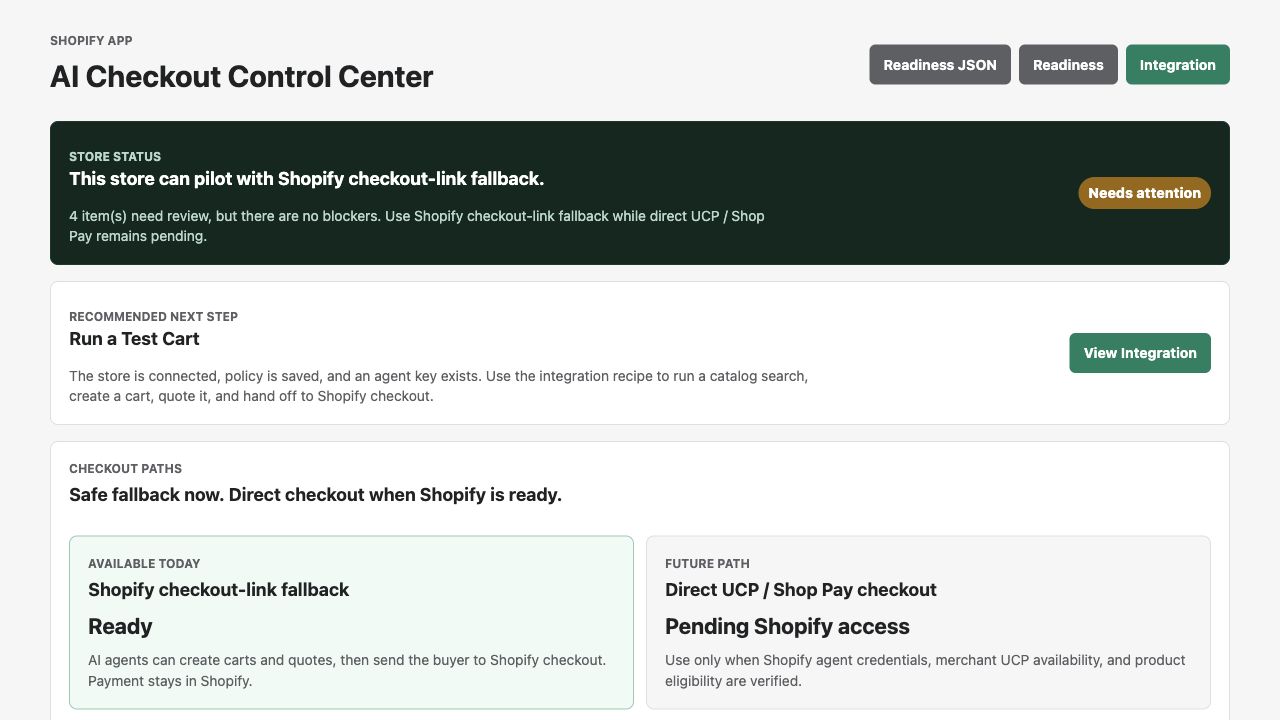
OAuth, Storefront access, webhook health, order sync, fallback checkout, agent keys, and policy status are grouped into one merchant-readable report.
AI Checkout Control Center for Shopify merchants
CartBridge helps Shopify merchants test AI-agent shopping, flag risky products, set agent rules, and keep normal Shopify checkout as the safe fallback.
Shopify owns checkout and payment. CartBridge gives merchants the control layer around AI shopping.
Install the Shopify app
Enter your Shopify store domain to install CartBridge, run the readiness check, and keep Shopify checkout as the safe fallback.
Why merchants need this
Shopify is building direct AI checkout primitives. That is good for commerce, but merchants still need to know which agents are active, which products are safe, what rules apply, where checkout should route, and whether orders reconciled correctly. CartBridge is the control center for that layer.
What CartBridge does today
OAuth, Storefront access, webhook health, order sync, fallback checkout, agent keys, and policy status are grouped into one merchant-readable report.
Advisory scans look for subscriptions, gift cards, bundles, digital products, customization, and special checkout instructions before agents route traffic.
Merchants can require approval, limit cart totals, block product types, and issue or revoke trusted agent keys.
When direct checkout is unavailable or risky, CartBridge creates a native Shopify cart, signs a quote, and returns the Shopify checkout link.
Product search, cart creation, quote approval, checkout handoff, UCP attempts, and order webhooks become readable merchant evidence.
Shopper payment, taxes, discounts, fraud checks, fulfillment, refunds, and analytics stay inside Shopify.
How it works
Scan store setup, webhook health, checkout fallback, UCP status, and product risk before agent traffic becomes production traffic.
Set approval requirements, max totals, blocked product types, and agent credentials for trusted AI shopping surfaces.
When direct AI checkout is unavailable or risky, CartBridge falls back to native Shopify checkout links with signed quote context.
Order webhooks, approvals, quotes, UCP attempts, and checkout handoffs reconcile into one audit trail merchants can read.
Checkout paths
CartBridge uses native Shopify checkout-link fallback by default. UCP / Shop Pay direct checkout is only used when Shopify credentials, merchant UCP availability, and product eligibility are verified. The fallback is not a failure; it is the safe v1 route.
Available today
Agents can create carts and quotes. Buyers complete payment through Shopify checkout.
Future path
Used only when Shopify exposes the path and the merchant store is eligible.
Merchant controls
See whether store connection, webhooks, fallback checkout, UCP, and product-risk checks are ready.
Search, cart, quote, approval, checkout handoff, UCP attempts, and order matching stay visible.
Merchant limits, approval requirements, blocked product types, and agent keys are enforced before checkout.
No raw card data is collected, proxied, stored, or logged by CartBridge.
For Shopify merchants
The first pilot walkthrough takes 15 minutes: install or review the dashboard, run the readiness scan, inspect product risk, and prove the checkout-link fallback.
Docs · Pricing · Privacy · Terms · Support
Production URL: https://cartbridge.ai